How Fleet Tracking Systems Receive and Process Telemetry Data
From GPS sensor to dashboard: how fleet tracking systems collect, encode, transmit, parse, and process Teltonika telemetry data.
Understanding what happens between a GPS device in a vehicle and data appearing in your application helps you build better telematics software. Here's the full pipeline.
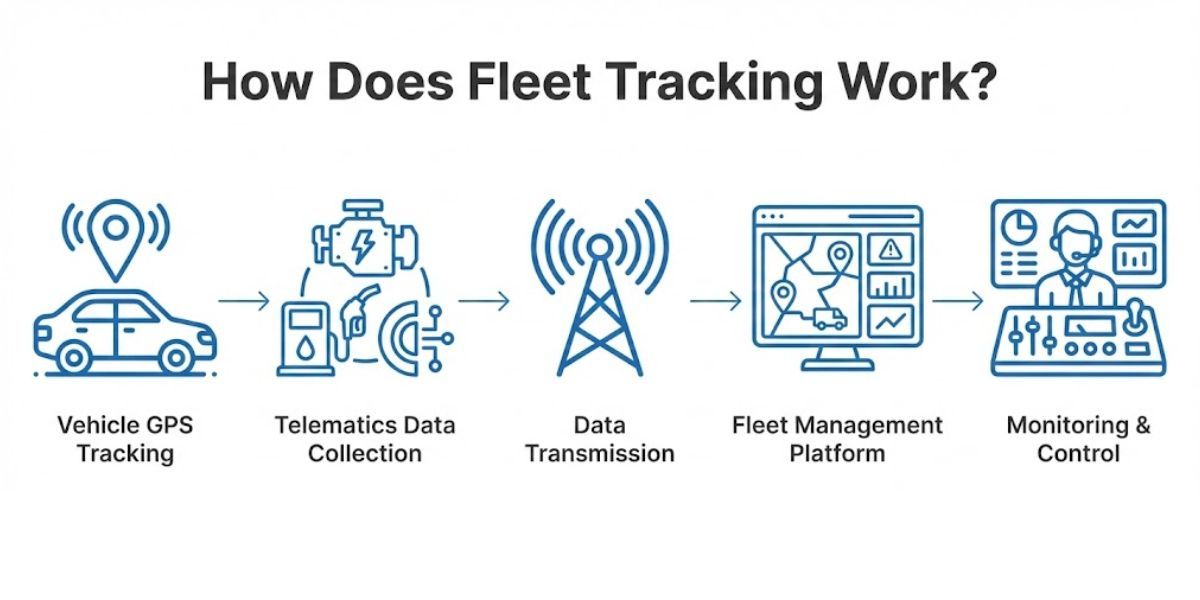
Step 1: The Device Collects Data
A GPS tracker installed in a vehicle pulls from multiple sources:
- GNSS - position, speed, heading
- Accelerometer - harsh braking, cornering, impact events
- CAN bus / OBD port - RPM, fuel level, odometer, fault codes
- Digital and analog inputs - ignition state, door sensors, temperature probes
These get aggregated into AVL (Automatic Vehicle Location) records - each containing a timestamp, GPS coordinates, and a set of IO parameters representing everything the device measured at that moment.
Step 2: The Device Sends a Packet
Devices transmit in compact binary to minimize bandwidth. Teltonika uses Codec8 or Codec8 Extended to pack multiple AVL records into a single TCP packet, with a CRC checksum for integrity.
The device opens a TCP connection, sends the packet, waits for an ACK, and closes the connection. This happens on a configurable interval or on events like ignition on/off.
Step 3: The Server Parses the Packet
A device server listening on TCP must:
- Identify the device via IMEI handshake
- Parse the binary payload per the codec specification
- Extract each AVL record and decode IO parameters
- Acknowledge the device
- Store or forward the data
IO parameter mapping - each numeric ID to a specific measurement - is where most complexity lives. The mapping varies by device model and firmware version.
Step 4: Data Reaches the Application
Parsed telemetry feeds:
- Live map views - real-time position updates
- Trip history - routes reconstructed from position sequences
- Alerts - speeding, geofence exit, low fuel thresholds
- Reports - fleet utilization, driver behavior, maintenance intervals
Testing the Full Pipeline Without Hardware
Validating each layer requires real codec packets hitting your server.
Telemify generates real Codec8 telemetry from virtual devices that move along defined routes - letting you exercise TCP parsing, database writes, and map rendering entirely in software, before any physical hardware arrives.
Try Telemify for free 👉 https://telemify.io